

This guide shows you how to install Divi Review Builder on your WordPress website.
Before you begin, make sure Divi 5 is installed and active.
Step 1: Download the plugin
Download the Divi Review Builder ZIP file from the place where you purchased it:
- DiviForge: Log in to your account and download the plugin.
- Elegant Themes Marketplace: Download the plugin from your Elegant Themes account.
- Mark Hendriksen All Access: Open the protected All Access downloads page and download Divi Review Builder.
Save the ZIP file to your computer. You do not need to unzip it.
Step 2: Open the plugin installer
Log in to your WordPress dashboard.
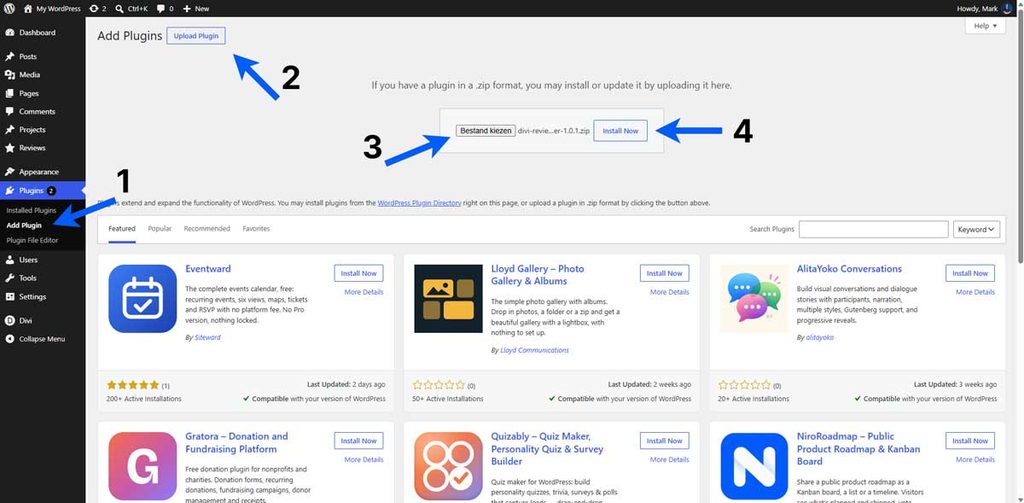
Go to Plugins → Add New Plugin, then click Upload Plugin at the top of the page.
Step 3: Upload the ZIP file
Click Choose File and select the Divi Review Builder ZIP file you downloaded.
Click Install Now and wait for WordPress to finish installing the plugin.
Step 4: Activate the plugin
When installation finishes, click Activate Plugin.
You should now see Reviews in your WordPress dashboard menu. The Divi Review Builder modules will also be available in the Divi Builder.
Step 5: Activate your license
If you downloaded the plugin from DiviForge or through Mark Hendriksen All Access, continue with the Activating Your License guide to enable updates.
The Elegant Themes Marketplace edition does not use a DiviForge license key.
What’s next?
You can now add your first review or import a Starter Layout to begin building your review section.